

Vibe coding is a way to create software by describing what you want in everyday language and letting an AI system generate much of the underlying code. Instead of beginning with programming syntax, you begin with an outcome—such as an app, website, dashboard, calculator, or internal business tool.
In this guide, we’ll explain the meaning and origin of vibe coding, how it works, practical examples, and how you can start using it i your day business.
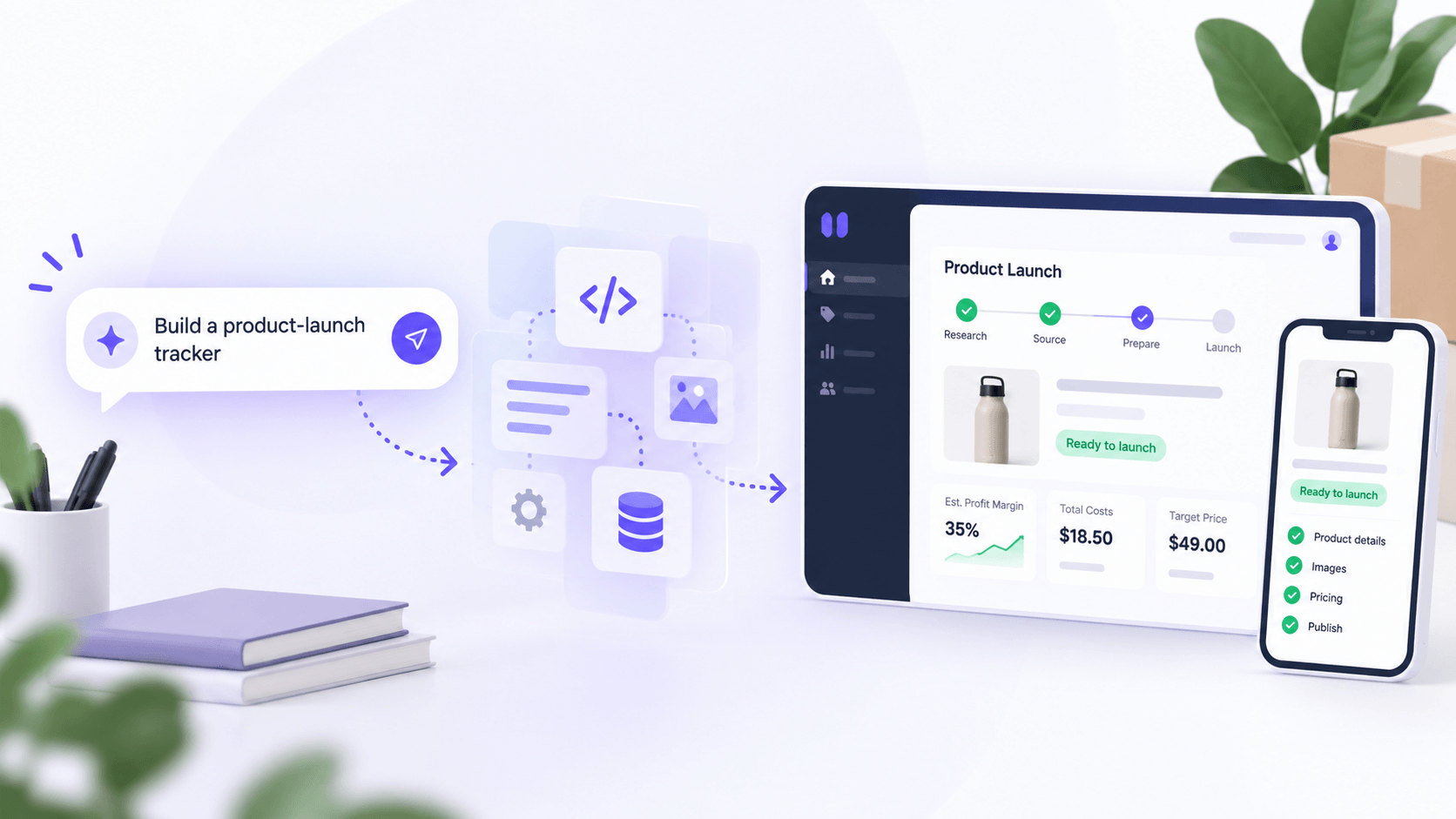
This lower barrier to software creation is one reason vibe coding has attracted attention from entrepreneurs, designers, product managers, and people with little or no traditional programming experience. It can help turn an idea into something interactive faster than starting from a blank codebase.
However, vibe coding does not remove the need for clear requirements, testing, security, or human judgment. An application can look complete while still containing incorrect logic, weak permissions, or other problems that are not immediately visible.
Article key takeaways
Vibe coding uses natural-language instructions to generate and modify software with AI.
The user focuses on describing the desired outcome, testing the result, and providing feedback, while the AI handles much of the implementation.
It can be useful for prototypes, experiments, internal tools, simple applications, and early product validation.
Vibe coding is related to AI-assisted coding, but the two terms do not mean exactly the same thing.
A working application is not automatically secure, accurate, scalable, or ready for real customers.
What is vibe coding?
Vibe coding is an AI-led approach to software development in which a person describes an application or feature in natural language and relies on an AI model to generate and revise the code.
The main difference is where the building process starts. In traditional software development, a developer usually decides how a feature should be implemented and writes the required code. With vibe coding, the user begins by explaining the result they want, while the AI makes many of the implementation decisions.
For example, instead of manually creating the interface, workflow, and data structure for an internal product-launch tracker, you could tell an AI:
Create a product-launch tracker for an ecommerce team. Let users add a product, assign an owner, set a launch date, track required images and copy, and move the product through Draft, Review, and Ready statuses. Show which requirements are still missing.
Depending on the tool, the AI may generate the interface, forms, status logic, data structure, and a working preview. You can then ask it to add validation, filter overdue launches, or improve the mobile layout.
The meaning of vibe coding therefore goes beyond asking an AI to complete an isolated line of code. It describes a workflow in which the person guides the product mainly through intent, feedback, and evaluation, while the AI performs a larger share of the technical implementation.
Vibe coding definition: Vibe coding is a software-development approach in which a person describes a desired application or feature in natural language and uses AI to generate and repeatedly modify much of the underlying code.
The person using the tool still has an important role. They must decide what should be built, identify missing requirements, assess whether the result solves the intended problem, and determine when the output requires further review.
This becomes increasingly important as the application grows more complex. A simple personal tool carries very different risks from a customer-facing ecommerce application that manages accounts, inventory, payments, or private information.
The original meaning versus how vibe coding is used today
The term “vibe coding” is now used in two closely related ways.
In its original, narrower sense, vibe coding describes a highly AI-dependent workflow in which a person focuses on whether the result appears to work without closely examining or fully understanding the generated code. The user follows the flow of the project, accepts AI-generated changes, and continues prompting until the application behaves as expected.
This version may involve very little direct interaction with the code itself. When an error appears, the user might copy it back into the AI tool and ask for a fix rather than investigating the implementation manually.
A broader meaning often used today includes conversational, prompt-led approaches to software creation. Under this definition, someone may still review generated code, run tests, correct problems manually, and involve experienced developers when necessary.
The distinction matters because not every use of an AI coding tool should be labeled vibe coding. A developer who asks AI to draft a test, explain an error, or suggest a function—and then carefully reviews every change—is using AI-assisted coding. A person who describes an entire application and lets the AI make most implementation decisions is closer to vibe coding.
In practice, the boundary between vibe coding and AI-assisted coding is not always clear. Many projects sit somewhere in the middle: the AI generates a significant portion of the software, while the human provides requirements, reviews important decisions, and intervenes when the output is unreliable.
Who coined the term “vibe coding”?
AI researcher Andrej Karpathy is widely credited with introducing the phrase “vibe coding” in a social media post dated February 2, 2025. He used it to describe an informal style of programming in which someone relies heavily on AI-generated code, focuses on the overall result, and pays less attention to the underlying implementation.
Vibe coding at a glance
Credited with coining: Andrej Karpathy
Post date: February 2, 2025
Original context: A highly conversational, AI-led approach to programming
Core idea: Describe what you want, let AI generate the code, and keep refining the result
What made the term distinctive: The user could build functioning software without manually writing—or fully understanding—every line of code
The phrase gained popularity because it gave a memorable name to a broader shift in software creation. People were no longer using AI only to complete individual lines of code or explain errors. They were beginning to describe entire features, generate working applications, and request changes through natural-language conversations.
The term also captured the experimental nature of the process. Rather than planning every technical decision before development begins, a person can start with a general idea, see what the AI produces, and adjust the application based on how it looks and behaves.
Merriam-Webster’s definition of vibe coding describes it as the practice of using AI to generate computer code and identifies Karpathy’s February 2, 2025 post as the apparent origin of the term.
Since then, the meaning has expanded to include prompt-led workflows in which the user tests the application, reviews important changes, and sometimes edits generated code manually.
That broader use makes software creation feel more approachable, but it also creates an important distinction: generating a working application is not the same as verifying that its underlying code is reliable, secure, or ready for real users.
How popular is vibe coding?
Vibe coding is highly visible in technology discussions, but available survey data suggests it remains much less common in professional development than broader AI-assisted coding.
In Stack Overflow’s 2025 survey, AI-tool use or intended use was common, while reported use of vibe coding in professional development work was much less widespread.
Vibe coding adoption by the numbers
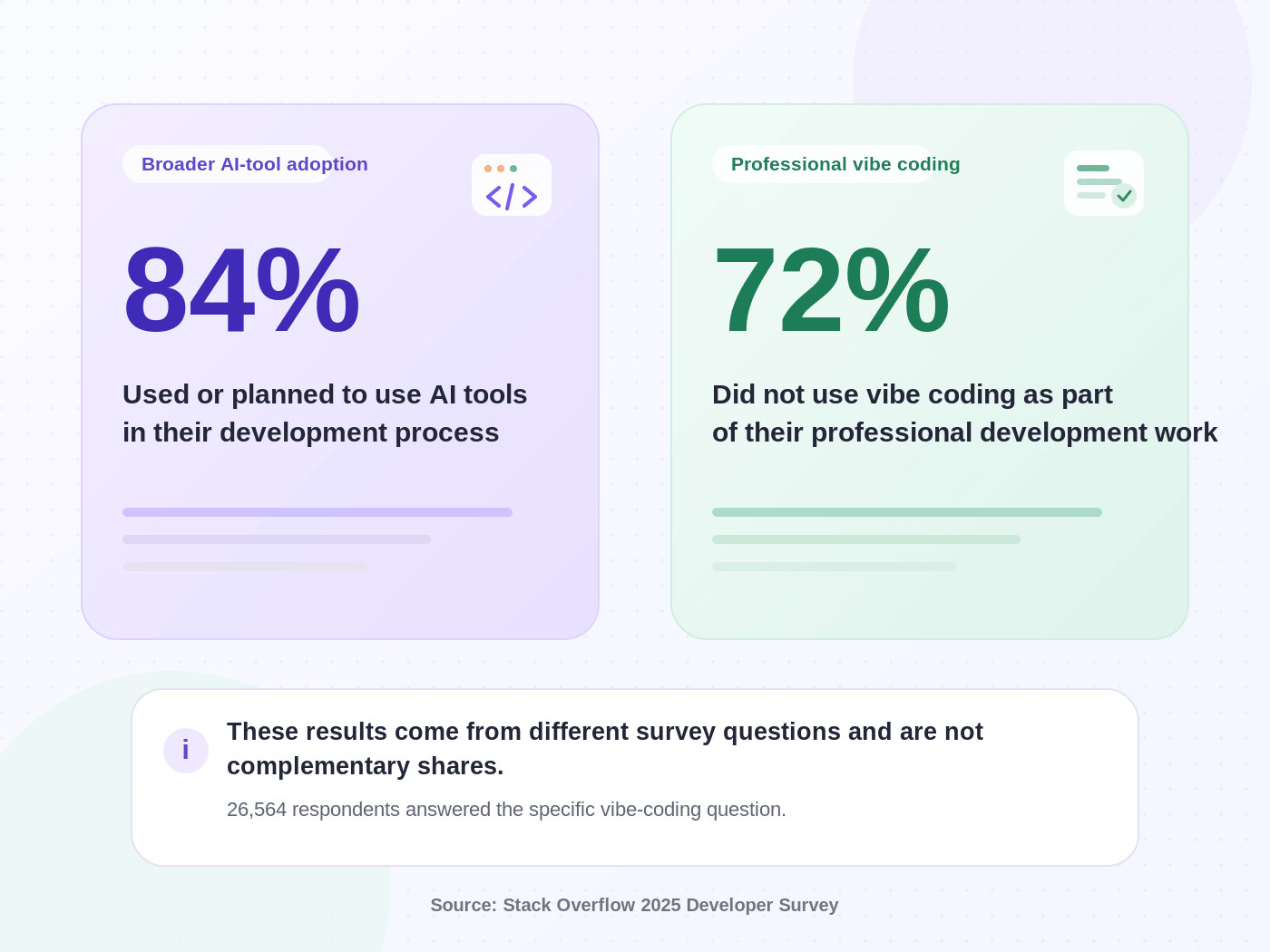
The survey received 49,009 responses from 177 countries, with respondents recruited primarily through Stack Overflow-owned channels. For the vibe-coding question, Stack Overflow defined the practice as generating software from prompts given to a large language model. The figures describe the survey respondents, not all developers worldwide.
What do these statistics actually mean?
The numbers highlight three important distinctions:
AI-assisted coding is broader than vibe coding. Developers may use AI to explain unfamiliar code, write tests, generate documentation, debug errors, or suggest individual functions without handing over the wider development process.
Using an AI coding tool does not automatically make someone a vibe coder. Many developers still design the system, review each change, and retain direct control over the implementation.
Adoption depends heavily on the project. Vibe coding is more practical for prototypes, personal tools, simple calculators, and internal experiments than for complex systems involving payments, private data, or business-critical operations.
The statistics are therefore not contradictory. A professional developer may use AI every day while remaining the primary implementer, whereas vibe coding shifts a larger share of implementation to the AI and places more emphasis on human direction and evaluation.
Stack Overflow’s 2025 Developer Survey therefore supports a narrower conclusion: AI-tool use or intended use was widespread among respondents, while most respondents said vibe coding was not part of their professional development work. The 84% figure is not a vibe-coding adoption rate.
How does vibe coding work?
In practice, vibe coding is an iterative workflow: describe the result, let the AI generate a first version, test it, and refine it through focused follow-up instructions.
The basic workflow looks like this:
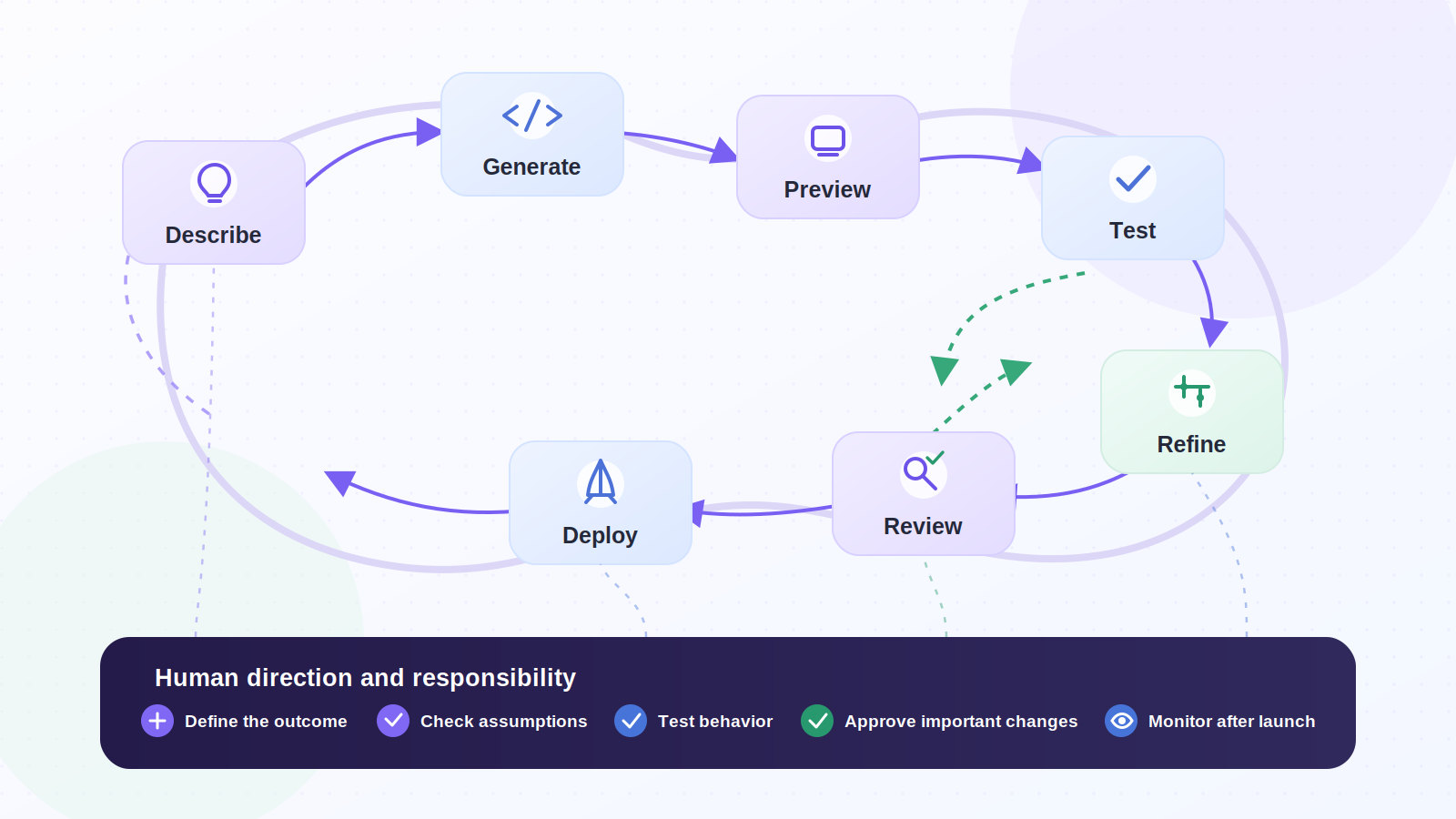
Each cycle should move the project toward a defined outcome. The AI may generate much of the implementation, but the user still judges whether it is accurate, useful, and safe.
Microsoft Research’s 2025 empirical study of vibe coding analyzed more than eight hours of curated video from extended vibe-coding sessions. It found that participants moved repeatedly between prompting, rapidly evaluating generated code, testing the application, and editing manually. The researchers concluded that vibe coding redistributes rather than eliminates programming expertise.
1. Describe the desired outcome
Start with a natural-language prompt that explains what the finished application should accomplish, not how every technical component should be built.
A useful initial prompt should define:
- The intended user and problem: Who will use the application, and what should it help them accomplish?
- The main workflow: What steps should the user be able to complete?
- The essential features and data: What must the first version include, collect, store, or display?
- The permissions and constraints: Who can access the information, and what should the AI avoid adding or changing?
- The success criteria: How will you know the result behaves correctly?
For example, this request is too broad:
Build an ecommerce tool.
A more useful prompt would be:
Create an internal product-launch tracker for an ecommerce team. Let users add a product, assign an owner, record required images and copy, set a launch date, and move the item through Draft, Review, and Ready statuses. Show missing requirements and overdue launches. Do not add payments or customer accounts.
2. Let the AI generate the first version
The AI then creates an initial implementation, which may include:
- The interface, forms, and navigation
- Workflow rules, calculations, and validation
- Data structures and storage
- Code, configuration, and a working preview
Treat the first version as a starting point. A polished interface can still hide misunderstood requirements or assumptions about permissions, storage, and behavior.
At this stage, the most important question is not “Does it look complete?” It is “Does it behave correctly?”
3. Test the actual behavior
Complete the main workflow as a real user would. For a product-launch tracker, add a product, move it through each status, and confirm that required information is preserved.
Test more than the happy path
Check what happens when:
- Required information is missing, malformed, or duplicated
- The same action is performed twice
- Records conflict or contain unusual values
- A user attempts an unauthorized action
- The application runs on a small screen or an external service fails
Test both the visible experience and the underlying result. A responsive button does not prove that the business rule, database action, or permission behind it is correct.
4. Refine the application with focused prompts
Describe one focused change at a time instead of combining unrelated requests.
Useful follow-up prompts might include:
- “Show an error when the launch date is missing.”
- “Do not allow a product to be marked Ready until the required images and copy are complete.”
- “Make the status cards easier to use on mobile without changing the workflow.”
- “Explain the current error before changing the code.”
Focused prompts make changes easier to evaluate and reduce the chance that a fix unintentionally alters another part of the application.
A useful rule: After every meaningful change, test the original workflow again. Do not assume that previously working features are still working.
5. Review the implementation, not only the interface
Visual testing eventually becomes insufficient. Review:
- How business rules and permissions are enforced
- Where data is stored and who can access it
- How credentials and external packages are handled
- How errors, duplicate logic, and failed actions are managed
Technical review becomes more important when an application handles accounts, sensitive data, financial actions, live business records, integrations, or complex authorization rules.
The AI can explain its implementation, but that explanation should not be treated as independent proof that the implementation is correct.
6. Deploy and continue monitoring
Once the initial version works, it may be deployed, but the project still needs ongoing oversight.
A live application may still require:
- Error, performance, and access monitoring
- Backups, recovery procedures, and security reviews
- Dependency updates, user feedback, and retesting after changes
Oversight should match the risk: a personal tool requires less monitoring than software used by customers or connected to live business systems. Vibe coding can accelerate delivery, but it does not remove maintenance.
A simple vibe coding example
To see that workflow in a concrete ecommerce context, imagine creating a product-profitability calculator for an ecommerce seller.
This is a useful first project because the scope is narrow, the output can be checked manually, and the tool does not need customer data or payment processing.
The goal
The calculator should allow a seller to enter:
- Wholesale product cost
- Shipping cost
- Fixed transaction fees
- Transaction fee percentage
- Advertising cost per order
- Current or proposed selling price
- Desired profit margin
It should then display:
- Total estimated cost per order
- Break-even price
- Estimated profit per order
- Current profit-margin percentage
- A recommended selling price based on the target margin
- A warning when the proposed price is below the break-even point
Modalyst’s profit margin calculator lets a user enter an item cost and target margin, then displays the resulting sale price, profit amount, and margin percentage. Reviewing an existing tool can help you define expected behavior before asking AI to create a more customized version.
Step 1: Write the initial prompt
A strong first prompt could look like this:
Create a responsive product-profitability calculator for ecommerce sellers. Let the user enter the wholesale product cost, shipping cost, fixed fees, transaction fee percentage, advertising cost per order, selling price, and desired profit margin. Calculate and display:
- Total cost per order
- Break-even selling price
- Estimated profit per order
- Current profit-margin percentage
- Recommended selling price based on the target margin
Add clear labels and short explanations for each result. Show a warning when the selling price is below the break-even price. Do not add user accounts, a database, payment processing, or external integrations. Make the calculator work well on desktop and mobile. Before building it, list any calculation assumptions you need to make.
The prompt defines the user, required inputs and outputs, first-version boundaries, and assumptions the AI should explain.
That final instruction matters because markup and profit margin are different calculations. Stating the formulas can expose a misunderstanding before it is built into the tool.
Step 2: Evaluate the first version with a known answer
Once the AI generates the calculator, test it with values you can verify independently. For example, assume:
- Product cost: $20
- Shipping cost: $5
- Fixed fee: $1
- Advertising cost: $4
- Selling price: $50
- Transaction fee: 3% of the selling price
- Desired profit margin: 30%
Under those assumptions—and excluding taxes, refunds, and costs not entered—the expected results are:
| Expected result | Value |
|---|---|
| Base costs before the percentage fee | $30.00 |
| Transaction fee at a $50 selling price | $1.50 |
| Total cost per order | $31.50 |
| Estimated profit per order | $18.50 |
| Current profit margin | 37.0% |
| Break-even price | Approximately $30.93 |
| Price required for a 30% target margin | Approximately $44.78 |
The break-even and target-margin price calculations must account for the percentage fee changing with the selling price. If the application simply adds 3% of the current $50 price to every scenario, those outputs will be wrong.
Before accepting the result, confirm that:
- Each stated cost is included once
- Profit equals revenue minus total costs
- Margin uses the selling price, and all outputs update consistently
A calculated price should also be considered within a broader business strategy. Modalyst’s guide to dropshipping pricing strategies covers fixed and tiered markup, manufacturer’s suggested retail price (MSRP), competition-based pricing, psychological pricing, and bundle pricing. A calculator can support a pricing decision, but it cannot decide which strategy best fits the product, audience, and market.
Step 3: Test unusual and invalid inputs
The initial version may work with normal values but fail in less predictable situations. Try:
- A blank, negative, or zero cost
- A fee or target margin outside the allowed range
- Very large or decimal values
- Letters or symbols in numeric fields
The tool should reject invalid calculations and explain what to correct. A focused follow-up prompt could be:
Add validation to every input. Do not allow blank values, negative numbers, zero where a positive value is required, or percentages at or above 100%. Show a specific message beneath the field that needs to be corrected. Do not change the existing calculation formulas.
Step 4: Make the results easier to understand
A correct result can still be hard to interpret. Ask the AI to show what each number means and which costs it includes:
Add a short explanation beneath each result. For the recommended selling price, show the formula in plain language and list the included costs. State that the result is an estimate and excludes taxes, refunds, or unexpected expenses unless the user enters them.
Then request visual changes separately:
Improve the mobile layout. Display one input per row, keep labels visible, and place the results in a separate summary section. Do not change any calculations or validation rules.
Separating functional and visual requests makes each revision easier to test.
Step 5: Recheck the complete workflow
After each change, repeat the known-answer test and confirm that:
- Calculations still match the expected values
- Validation rejects bad inputs without blocking valid ones
- Results update when an input changes
- Earlier requirements and the mobile layout still work
When does this simple project become more complex?
The calculator remains relatively low risk while it stores no personal data, uses clear assumptions, and produces verifiable estimates.
The project becomes more complex if it connects to a live store, imports order or customer data, saves information in user accounts, automatically changes prices, or acts without human approval. At that point, authentication, permissions, data security, integration reliability, and error recovery become central requirements.
The pattern to remember: Start with one narrow outcome, test it against a known answer, refine one issue at a time, and validate the complete workflow after every meaningful change.
What can you build with vibe coding?
The calculator is one low-risk example, but the same approach can support personal apps, internal dashboards, portals, and early product prototypes.
Across those categories, the better question is not only “Can AI build this?” It is also:
Can you clearly define the result, test whether it works, and manage the consequences if something goes wrong?
The strongest first projects usually have:
- One primary user and one core problem
- One main workflow
- Three to five essential features
- An output that can be checked independently
- Limited consequences if the application fails
8 types of projects you can build with vibe coding
| Project type | Example | Why it works well |
|---|---|---|
| 1. Calculators | Profit-margin, shipping-cost, budget, or quote calculator | The inputs, formulas, and expected outputs can usually be defined and checked |
| 2. Internal dashboards | Sales overview, campaign tracker, or reporting dashboard | Dashboards bring information together without necessarily changing the original data |
| 3. Forms and portals | Client intake form, employee request portal, or product-review submission page | The workflow follows a clear sequence of collecting, storing, and displaying information |
| 4. Workflow tools | Approval tracker, product-launch checklist, or content calendar | Repetitive processes can be translated into statuses, tasks, owners, and deadlines |
| 5. Personal productivity apps | Habit tracker, meal planner, journal, or subscription manager | These apps usually have a narrow audience and relatively low-risk data |
| 6. Content and marketing utilities | Campaign brief creator, headline generator, or social content organizer | The application can combine a simple interface with repeatable content workflows |
| 7. Directories and simple marketplaces | Local service directory, niche product catalog, or community exchange | A first version can focus on listings, categories, search, and contact actions |
| 8. Minimum viable products (MVPs) and interactive prototypes | An early software product, mobile experience, or business idea | A functional prototype helps users test the workflow before investing in a larger build |
These categories can overlap. An internal product-research tool, for example, might combine a form, stored records, a dashboard, and an AI-generated summary. The goal is to identify the smallest useful version that can be built and tested independently.
What can ecommerce businesses build with vibe coding?
For ecommerce teams, the same selection logic often points to spreadsheets, repeated data entry, and manual reviews across several platforms. Those workflows are useful starting points.
Examples include:
- A product-launch tracker for assets, owners, approvals, and deadlines
- A returns-cost estimator that compares refunds, replacements, and shipping expenses
- An AI chatbot for customer support or an internal knowledge tool for common questions
- A merchandising experiment log for pricing, bundles, positioning, and promotions
- A product-research organizer for ideas, competitor notes, estimated margins, and test status
Some tools may use generative AI after they are built, while others simply use AI during development. A campaign tracker may need only forms, statuses, and reports; a support assistant may continue using AI to search information and draft responses.
A three-level test for choosing a vibe coding project
Whatever the use case, classify the idea by risk before building.
| Risk level | Typical characteristics | Examples |
|---|---|---|
| Lower risk | No sensitive data, limited users, easy-to-check results, little impact if it fails | Calculator, checklist, personal tracker, content planner |
| Moderate risk | Stores business data, uses accounts, connects to another tool, or supports a team workflow | Internal review dashboard, client portal, customer-support tool |
| Higher risk | Handles payments, private customer information, identity, legal obligations, or automated financial decisions | Checkout system, payment application, authentication service, automatic repricing system |
Lower-risk projects are usually the best place to begin. Moderate-risk applications require deliberate controls for permissions, data storage, integrations, backups, and ownership; higher-risk systems need the stronger controls covered later in this guide.
Start with the smallest useful version
After classifying the risk, reduce the idea to the smallest version that can test the workflow. For a product-launch review tool, the first version does not need automated publishing, live inventory updates, campaign generation, messaging, or customer data.
A smaller version might include only:
- A form for adding a proposed product
- A checklist for required images, copy, pricing, and approvals
- An owner, deadline, review status, notes, and final decision
That is enough to test the workflow before adding more functionality.
Where can you find more vibe coding ideas?
Modalyst’s AI tools for dropshipping can inspire ideas; so can manual work that creates friction:
- A spreadsheet that is becoming difficult to maintain
- A recurring report assembled from several sources
- A process managed through email threads and reminders
- Information teammates repeatedly struggle to find
These are often better starting points than inventing a new app category. The best first project solves one repeated problem with few moving parts.
Vibe coding vs traditional coding, AI-assisted coding, and no-code
Once you have chosen a problem worth solving, the next question is how to build it. Vibe coding sits alongside traditional programming, AI-assisted coding, and no-code development, with each approach dividing implementation, review, and maintenance differently.
A quick comparison
| Approach | Primary input | Human responsibility | Best suited to | Main trade-off |
|---|---|---|---|---|
| Vibe coding | Natural-language prompts and feedback | Define the outcome, test the result, and decide what needs to change | Prototypes, MVPs, internal tools, experiments, and relatively simple applications | The generated implementation may be difficult to understand, debug, or maintain |
| AI-assisted coding | Code combined with targeted AI instructions | Design the system, review suggestions, and retain control of the implementation | Accelerating professional software development | AI suggestions may still be incorrect, insecure, or inconsistent |
| Traditional coding | Programming languages, frameworks, and technical specifications | Design and directly implement the application | Complex, specialized, regulated, or business-critical systems | Usually requires more technical expertise and manual implementation |
| No-code development | Visual components, settings, and predefined workflows | Configure the platform’s available features | Standard business apps, forms, websites, portals, and automations | Flexibility may be limited by the platform’s components and capabilities |
The right method depends on complexity, risk, timeline, and maintenance needs. A project may begin as a vibe-coded prototype and later use traditional or AI-assisted development.
Vibe coding vs traditional coding
Traditional coding starts with technical implementation: a developer chooses the architecture, languages, frameworks, database, and components, then writes and connects them.
Vibe coding starts with the intended result, while the AI makes more of the initial implementation decisions.
For a returns-analysis tool, a developer might define the data model, permissions, filters, and failure handling directly; a vibe coder would describe the workflow and let the AI propose much of that structure.
Vibe coding can be faster at the beginning. Traditional coding offers more direct control over specialized logic, performance at scale, complex permissions, sensitive data, integrations, regulated decisions, and long-term maintenance.
The approaches are not opposing choices. A project can begin conversationally and move toward more structured engineering as its complexity, user base, and business importance grow.
Vibe coding vs AI-assisted coding
Vibe coding is a form of AI-assisted software creation, but the terms are not interchangeable. The key differences are how much implementation is delegated and who remains the primary implementer.
Consider four levels of AI involvement:
- AI as an autocomplete tool: The developer begins writing code, and the AI suggests the next line or block.
- AI as a technical assistant: The developer asks the AI to explain an error, create a test, document a function, or suggest a solution.
- AI as an implementation partner: The developer describes a complete feature and asks the AI to create it, but still reviews and understands the generated code.
- AI as the primary builder: The user describes the application, evaluates the visible result, and continues prompting the AI to implement most changes.
The first three are generally forms of AI-assisted coding. The fourth is closer to the original meaning of vibe coding, although a person may move between these levels during the same project.
The simplest distinction: In AI-assisted coding, the human normally remains the primary implementer. In vibe coding, the AI takes on a larger share of implementation while the human directs and evaluates the result.
Vibe coding vs no-code
No-code introduces a different comparison because it changes the interface used to build software. These platforms replace programming syntax with visual components, templates, and configurable workflows.
Vibe coding replaces much of that manual configuration with natural-language instructions.
The approaches therefore differ in their main interface:
- No-code: The person builds by selecting and configuring available components.
- Vibe coding: The person builds by describing the intended behavior and refining the generated result.
Modern platforms can combine both approaches. For example, Base44’s AI app builder lets users describe an app in natural language and generate screens, data, backend logic, authentication, permissions, integrations, and deployment within one managed platform.
Managed platforms reduce setup work, but portability, customization, and integrations still depend on the provider. Builders remain responsible for permissions, data access, and business rules.
No-code is not being replaced by vibe coding. Natural-language generation is becoming another way to interact with no-code and low-code systems.
Which approach should you use?
These distinctions lead to a practical choice: vibe coding may be a good fit when the first version is narrow, its output can be checked, the data is not highly sensitive, and mistakes are easy to reverse.
A more controlled development process is usually necessary when failure could interrupt operations, expose private data, create financial consequences, or leave a complex system that a team must maintain over time.
For an ecommerce business, the best answer is often a combination. Vibe coding can prototype a campaign planner, internal review workflow, or guided product finder, while established ecommerce platforms continue to manage foundational commerce operations.
A practical rule: Use vibe coding to explore and validate the concept. Introduce more structured engineering as the application becomes more important, interconnected, or difficult to reverse.
What are the benefits of vibe coding?
Used for the right kind of project, vibe coding can shorten the path from an idea to working software, allowing people to test an outcome before every technical detail is planned.
Its value is not limited to speed. Vibe coding can also broaden participation in software creation, improve collaboration, and make narrow custom tools more practical to build.
1. Faster prototyping and validation
A written brief or static mockup can show what an application might look like. A working prototype reveals how it behaves.
An ecommerce team could test a campaign-approval workflow with a brief, asset checklist, owner, reviewer, deadline, and status before adding integrations, publishing, analytics, or complex permissions.
The prototype can reveal:
- Whether users can complete the main task
- Which steps or decisions are missing
- Which features are unnecessary
- Whether the workflow works on mobile
The benefit is not simply building faster. It is learning what deserves to be built before expanding the project.
2. A lower barrier to software creation
Traditional programming requires knowledge of languages, frameworks, databases, hosting, and other technical systems. Vibe coding allows someone to begin with the language they already use to describe a business problem.
A subject-matter expert can define the users, workflow, business rules, data, and expected result, while the AI translates those requirements into an initial implementation. This allows entrepreneurs, marketers, operations teams, designers, and product managers to participate more directly in software creation.
The lower barrier does not mean technical complexity disappears. As the application becomes more important, technical expertise becomes increasingly valuable for security, architecture, performance, and long-term maintainability.
3. Shorter feedback and iteration cycles
A working application lets teams observe actual behavior and request focused changes, such as:
- Move a field earlier in the workflow
- Prevent approval when required information is missing
- Add a view for overdue work
- Remove an unproven feature from this version
This creates a shorter feedback loop:
Build → Test → Observe → Learn → Revise
Speed helps only when each change responds to evidence. Easy-to-generate features can still make the product harder to use and maintain.
4. More direct collaboration between technical and nontechnical teams
Software requirements can lose detail as they move between business owners, product managers, designers, and developers. Vibe coding gives nontechnical specialists a way to represent their knowledge more directly.
A marketer can prototype a campaign workflow, an operations manager can build an approval tracker, a finance specialist can define a calculation, a support manager can organize a knowledge tool, and a designer can test an interaction.
Developers still matter when the application must become secure, reliable, and scalable, but they can begin with a functioning representation of the intended workflow.
5. Custom tools for narrow business problems
Many businesses rely on workflows that are too specific for a generic tool but too small to justify a major custom development project.
Examples include:
- Reviewing product samples and launch readiness
- Tracking campaign assets and approvals
- Organizing return reasons or recurring reports
- Preparing product information before it reaches the store
A custom application can sit before, after, or alongside an established platform rather than replacing it. For example, a team could organize product information and campaign goals before they move into an email workflow; Modalyst’s guide to AI-powered email automation provides broader context on that marketing process.
6. Greater leverage for experienced developers
Developers can use prompt-led workflows for prototypes, repetitive components, tests, documentation, internal utilities, and early versions of noncritical features.
Their experience helps them recognize unreliable or unnecessarily complex output. Used carefully, vibe coding can reduce repetitive implementation work and leave more time for architecture, security, performance, complex business logic, integration design, and maintenance. The value still depends on review; speed matters little if the result becomes hard to understand or maintain.
When are the benefits strongest?
Vibe coding tends to provide the most value when five conditions are present:
| Condition | Why it matters |
|---|---|
| The problem is clearly defined | The AI receives fewer ambiguous or conflicting requirements |
| The first version is limited in scope | The result is easier to test and correct |
| The output can be verified | Errors can be identified without relying only on the AI’s explanation |
| Mistakes are reversible | A failed experiment does not create significant customer or business harm |
| A person remains accountable | Someone is responsible for deciding whether the result is acceptable |
When these conditions are met, vibe coding can make software creation faster, more accessible, and more closely connected to real user needs. That same speed becomes a disadvantage when generated changes are accepted without testing or when a prototype is treated as a finished system.
What are the risks and limitations of vibe coding?
Those benefits depend on clear limits and active review. The main risk is that an AI-generated application can appear to work while hiding problems the builder does not know to check.
A polished interface may still contain incorrect logic, weak permissions, exposed credentials, insecure dependencies, or failures outside the ideal scenario.
Common vibe coding risks at a glance
| Risk | What it may look like |
|---|---|
| False confidence | The main workflow works once, so the application is assumed to be complete |
| Incorrect logic | Calculations or business rules produce believable but inaccurate results |
| Security vulnerabilities | Authentication, permissions, secrets, or data access are configured incorrectly |
| Dependency risks | The AI adds outdated, unsafe, or nonexistent software packages |
| Technical debt | Repeated prompts produce duplicated or conflicting code |
| Privacy problems | Sensitive data is exposed to users, services, or AI providers |
| Difficult maintenance | No one understands how the application is structured |
| Platform dependence | The project becomes difficult to move or operate outside the original tool |
1. A working preview can create false confidence
A working preview proves only that a particular scenario succeeded.
It does not show how the application handles missing data, duplicate actions, simultaneous edits, failed services, different permissions, or unusual edge cases.
An approval tool, for example, might allow a product to be marked Ready with missing assets or expose an admin action to the wrong user.
A successful demonstration proves that one scenario worked. It does not prove that the application is accurate, secure, scalable, or ready for customers.
2. Incorrect business logic
AI can implement believable but incorrect business logic, especially in areas such as:
Pricing, tax, and discount calculations
Shipping and inventory rules
Refund eligibility and commissions
Rankings, forecasts, and automated decisions
The AI may misunderstand a term, make an unstated assumption, or apply the right formula to the wrong value.
For example, markup and profit margin are related but different; a polished-looking percentage can still be based on the wrong formula.
Verify important outputs against manual calculations, historical cases, or a trusted independent tool.
3. Security vulnerabilities
Generated software can contain weaknesses in authentication, authorization, input validation, data access, and secrets management.
Examples include:
Users seeing records that do not belong to them
Admin actions being available to ordinary users
Credentials or API keys appearing in frontend code
Database rules allowing unnecessary access
Sensitive actions running without login, validation, or user verification
The OWASP Secure Coding with AI Cheat Sheet warns about hallucinated packages, broad agent permissions, out-of-scope edits, and tests generated by the same agent. It recommends verifying dependencies and independently reviewing security-sensitive changes.
Review is especially important when the application handles customer data, payments, business records, or employee access.
4. Sensitive information can be exposed
Vibe coding tools may receive more context than the user realizes.
Depending on the product and configuration, the AI may see:
Open files, project folders, and database structures
Terminal output, error logs, and API responses
Environment settings and configuration files
Information entered in prompts
A builder should avoid placing passwords, tokens, API keys, private customer information, or confidential documents directly into prompts.
Review the provider’s controls for:
Data collection, retention, and model training
Storage location and project access
Secrets management and encryption
File and workspace permissions
Do not assume a .gitignore file prevents an AI coding tool from reading a file; it tells Git which untracked files to ignore. Review the product’s context-exclusion, file-access, and privacy settings.
5. Unsafe or unnecessary dependencies
AI-generated projects often rely on third-party packages, and an AI may suggest one that is outdated, vulnerable, unnecessary, or nonexistent. A malicious package can also use a name that resembles a legitimate one.
This creates a software supply-chain risk.
Each dependency adds maintenance and monitoring work. A simple application should not need numerous packages for a basic workflow.
Before adding one, check:
Why it is needed and whether it actually exists
Who maintains it and when it was last updated
Whether it has known vulnerabilities
Whether the same result can be achieved without it
6. Technical debt can accumulate quickly
Repeated prompts can add features without considering how they fit into the wider application.
The result may include:
Duplicate functions or components
Conflicting data structures and field names
Repeated validation rules
Unused files
Workarounds layered on earlier workarounds
The application may keep working at first, but each new request becomes more likely to break something else.
A common pattern is that one fix introduces a workaround, which creates another exception elsewhere.
Over time, the system may become difficult for anyone to understand.
Periodic cleanup and refactoring are therefore important. Ask the AI to explain duplicated logic or propose a simpler architecture, but have important changes reviewed independently.
7. Testing generated by the same AI may be incomplete
AI-generated tests can repeat the same misunderstanding as the implementation.
If the AI used the wrong margin formula, for example, it may create a test that confirms the same error.
Passing tests therefore do not automatically prove that the business behavior is correct.
Include test cases defined independently:
Manually calculated or historical examples
Invalid, unusual, and empty inputs
Different user roles and permissions
Failed services and repeated actions
Simultaneous updates
The person responsible for the application should define what correct behavior means before asking AI to test it.
8. Platform and vendor dependence
Some tools bundle code generation with hosting, databases, authentication, deployment, integrations, and monitoring. This simplifies setup but can increase platform dependence.
Before committing, ask:
Can the application and data be exported?
Who owns the generated code, and can another developer maintain it?
Can the project move elsewhere?
How do pricing, paid features, backups, and integrations affect long-term use?
What happens if the provider changes a feature or removes an integration?
This does not mean managed platforms should be avoided. It means their role should be understood before the application becomes business-critical.
9. Core ecommerce systems carry higher consequences
An internal campaign planner and a customer checkout system should not be treated as equivalent projects.
A failure in an internal tool may create inconvenience. A failure in checkout, payments, inventory, taxes, or customer accounts can affect revenue, privacy, and legal obligations.
Established ecommerce software commonly provides product and inventory management, payment processing, order management, security, and integrations. A vibe-coded tool can complement those systems without attempting to replace every foundational function.
Use greater caution with:
Checkout, payment processing, and refunds
Customer authentication and private data
Inventory and order systems of record
Tax logic and fraud detection
Supplier payments
Automated pricing or other high-impact actions
Managed security features help—but do not remove responsibility
Some managed AI app-building platforms provide built-in controls such as access rules, secrets management, security scans, and authentication.
For example, Base44’s security documentation describes checks for exposed credentials, vulnerable packages, insecure code patterns, overly broad data access, and login gaps. It also states that builders are responsible for reviewing permissions and running a security scan before publishing.
This is the appropriate way to think about platform security:
Built-in controls can reduce common risks, but they do not understand every business rule, user relationship, or data sensitivity unique to the application.
How to start vibe coding and drive results
Moving fast and wining with vibe coding does not abandon fast experimentation.
A personal calculator needs fewer controls than an application managing customer accounts. The aim is to identify relevant risks before users or business data are exposed.
The following ten-step process provides a practical starting point.
1. Choose a low-risk first project
Choose a project that is:
Narrow and easy to test
Reversible
Used by a limited audience
Unconnected to sensitive data
Unlikely to cause serious harm if it fails
Good first projects include a calculator, campaign checklist, product-research organizer, simple dashboard, content planner, or merchandising experiment log.
Avoid beginning with checkout, authentication, payments, private customer records, or automatic changes to live business systems.
2. Define one user, one problem, and one workflow
Define the first version with:
- One primary user: Who is the application for?
- One core problem: What repeated difficulty does it solve?
- One main workflow: What should the user be able to complete?
- Three to five essential features: What is required for the first useful version?
- One measurable outcome: How will you determine whether it works?
For example:
The application is for an ecommerce manager who needs to review products before launch. The user should be able to add a product, assign an owner, check required assets, and record an approval decision.
That is clearer than asking for a complete ecommerce operations platform with automation, analytics, publishing, payments, and inventory integrations.
A narrow scope makes the generated application easier to evaluate and reduces the number of assumptions the AI must make.
3. Classify the data before building
List every type of information the application will collect, display, or store.
Then classify each type, using the NIST Privacy Framework as a privacy-risk reference:
| Data type | Example | Initial approach |
|---|---|---|
| Public | Product category or public product page | Generally lower risk |
| Internal | Private notes or campaign plans | Restrict to authorized team members |
| Personal | Names, email addresses, account activity | Review privacy and access requirements |
| Sensitive | Passwords, tokens, payment details, identity documents | Avoid unless proper security controls and expert review are available |
Also define who can view, create, edit, delete, export, or administer each type of information.
Do not leave permissions until the end of the project.
4. Select the tool according to the project
Tools provide different levels of infrastructure and control, including conversational code generators, AI-enabled editors, coding agents, browser-based app builders, and no-code platforms with natural-language generation.
Evaluate:
Hosting, database, and authentication support
Access rules and secrets management
Version history, logs, and security scans
Export options and portability
Integration limits and paid-plan requirements
Support for growth and maintenance
A managed platform may reduce setup work, while a code-based tool may offer greater control. Neither option removes the need to understand the project’s data and risk level.
5. Write a structured initial prompt
A good prompt should define the outcome without attempting to dictate every line of code.
Use this framework:
Create a [type of application] for [specific user]. It should help the user [primary outcome]. The main workflow is:
[Step one]
[Step two]
[Step three]
Include: [essential feature], [essential feature], and [essential feature]. Do not include: [excluded feature] or [excluded feature]. Data: [types of data]. Permissions: [user type] can [actions]. Design it for [device or context]. Before building, list missing requirements, assumptions, security concerns, and unclear business rules.
Asking the AI to identify assumptions before implementation can reveal ambiguity early.
6. Build one workflow at a time
Do not ask the AI to create every planned feature in the first version.
A staged build might:
Create the primary interface and workflow
Add validation and data storage
Add accounts and permissions if required
Connect one external integration
Improve mobile behavior
Add monitoring and error handling
Test each stage before moving to the next one.
When requesting changes, separate functional and visual instructions.
Add validation to the product-launch form. Do not change the layout, database fields, or approval rules.
Then request the visual change separately:
Improve the mobile layout. Do not change validation, permissions, or data behavior.
7. Test with known answers and difficult scenarios
Test before the application is considered complete, using four categories:
Expected behavior
Can a normal user complete the main workflow?
Invalid behavior
What happens when information is blank, malformed, duplicated, or outside the expected range?
Permission behavior
Can each user see and change only the information they are authorized to access?
Failure behavior
What happens when a database, API, payment provider, or other external service is unavailable?
Test with independently verified calculations, users in different roles, repeated actions, and failed-service scenarios—not only the path the AI demonstrated.
8. Review security-sensitive areas independently
Security-critical features deserve greater scrutiny than styling or layout changes.
Review:
Authentication, authorization, and access rules
Secrets, credentials, and input validation
File uploads and external packages
Payments and other high-impact actions
Admin functions, logs, and error handling
NIST’s 2024 SSDF Community Profile for generative AI adds practices specific to AI model development to the broader Secure Software Development Framework. It is intended for producers of AI models, producers of systems that use them, and acquirers of those systems. It is not a vibe-coding standard, but it reinforces the broader principle that security should be addressed throughout development rather than only at the end.
For a low-risk prototype, this review may be relatively simple. For a customer-facing or business-critical application, it may require an experienced developer or security professional.
9. Keep recoverable versions
AI-generated changes can affect more of the application than expected.
Before each substantial change:
Save a working version
Record the request and affected files
Retest the main workflow
Confirm that earlier requirements still work
Version history lets you return to a stable state and gives future maintainers a record of how the application evolved.
10. Launch gradually and continue monitoring
Do not move directly from a successful preview to a full public launch.
Use a staged approach:
Test privately with an internal group
Fix unclear workflows and visible errors
Test with a limited group of real users
Review security and data access before expanding access
After launch, monitor:
Application errors and failed actions
Unusual behavior or access-control issues
Slow pages and broken integrations
User feedback
Changes in third-party dependencies
Publishing is not the end of the development process. A live application needs ownership, maintenance, and a clear response plan when something fails.
Responsible vibe coding checklist
Before publishing, confirm that:
The application solves one clearly defined problem.
The main workflow has been tested from beginning to end.
Calculations have been checked independently.
Invalid and unusual inputs have been tested.
User roles and permissions have been reviewed.
No passwords, API keys, or private credentials are exposed.
Sensitive data is not being sent to an unapproved AI service.
External packages and integrations have been reviewed.
A recoverable working version exists.
Someone is responsible for monitoring and maintaining the application.
Responsible vibe coding preserves the speed of experimentation while adding enough structure to recognize when a project needs stronger testing, controls, or technical review.
How ecommerce businesses can use vibe coding
With those controls in place, ecommerce businesses can use vibe coding most effectively as a flexible layer around the systems that already run the store. It is well suited to experiments, business-specific workflows, and lightweight decision support—but not as a substitute for systems that process transactions or hold sensitive records.
Where vibe coding fits in an ecommerce technology stack
It helps to separate the ecommerce stack into two layers. The operational layer keeps products, customers, orders, payments, and inventory accurate. The adaptive layer helps a team test ideas, evaluate opportunities, and tailor workflows to the way the business operates.
Vibe coding fits more naturally in the adaptive layer.
| Good fit for vibe coding | Requires established infrastructure and stronger controls |
|---|---|
| Merchandising experiments and internal review tools | Checkout, payments, refunds, and tax logic |
| Lightweight reporting and decision support | Customer accounts, authentication, and permissions |
| Early customer-experience prototypes | Inventory records and business-critical order processing |
| Temporary workflows using sample or read-only data | Sensitive customer data and automated changes to live systems |
Build around decisions, not transactions
Within that adaptive layer, a useful starting principle is to build a tool that helps someone make a decision rather than one that immediately changes a live system.
For internal workflows, a retailer could create a product-launch review tool based on its own criteria, such as brand fit, content readiness, delivery region, expected margin, or return risk. The tool could highlight missing information and present a recommendation for a team member to review.
The first version would not need permission to publish a product, change its price, place an order, or update inventory. Keeping the output advisory makes the experiment easier to test and reverse.
For customer-facing experiments, a store could prototype a guided product finder, a bundle-selection flow, or a new way to explain shipping choices. The initial version could use a limited catalog and anonymous test inputs. The goal is to learn whether customers understand and use the experience before connecting it to accounts, order history, or personal information.
Connect to live systems gradually
If the workflow proves useful, connect it to live systems in three stages:
Prototype with sample data or manual entry.
Connect to selected exports or read-only data once the workflow proves useful.
Introduce write access or automated actions only after reviewing business rules, permissions, failure handling, and recovery.
For a dropshipping business, this approach keeps experimentation separate from day-to-day operations. Modalyst’s retailer features support sourcing and listing products, importing product information, viewing supplier inventory and shipping details, and managing orders. A vibe-coded tool can complement that foundation with a company-specific review process, experiment log, or planning interface instead of attempting to recreate the operational layer.
Before building, ask:
Does the tool help us learn, compare, or decide?
Can a mistake be caught before it reaches a customer or changes live business data?
When both answers are yes, the idea is more likely to be a practical candidate for vibe coding.
The guiding principle is simple: customize the workflows that differentiate the business, while relying on mature infrastructure where reliability, security, and compliance matter most.
Frequently asked questions about vibe coding
The answers below address the practical questions that most often arise when deciding whether and how to use vibe coding.
Is vibe coding safe?
Vibe coding can be safe for appropriately scoped projects, but it is not safe by default. Risk depends on the application, the data it handles, the permissions it grants, and how thoroughly it is tested. A private tool using sample data carries less risk than a customer-facing application managing accounts or payments. Security-sensitive features should receive independent review rather than relying only on the AI that generated them.
Can vibe-coded applications be used in production?
Vibe-coded applications can be used in production, but the label describes how they were built—not whether they are production-ready. Readiness depends on testing, code quality, security, access controls, monitoring, backups, performance, and maintenance ownership. A narrow internal tool may require relatively simple controls, while an application handling customer data or financial transactions requires a more rigorous engineering and review process.
What can ecommerce businesses build with vibe coding?
Ecommerce businesses can use vibe coding for product-research tools, campaign planners, merchandising experiments, guided product finders, internal review workflows, and lightweight decision-support applications. The strongest opportunities usually sit around the core commerce platform rather than replacing it. Checkout, payments, customer accounts, inventory records, tax logic, and order processing should remain on established systems unless a replacement receives appropriate technical, security, and operational review.
Is vibe coding just hype, or will it last?
Some of the attention around vibe coding is hype, but the underlying workflow is likely to last. People are increasingly able to create and modify software through natural-language instructions, even if the label eventually becomes less fashionable. What should fade is the assumption that prompting removes the need for testing, technical judgment, security, or maintenance.
Do people really make money from vibe coding?
People can make money from products or services built through vibe coding, but the method itself does not create demand or guarantee income. A vibe-coded application might become a paid product, part of a client service, or an internal tool that improves an existing business. For ecommerce, the fundamentals in a dropshipping business plan still apply: choosing a useful offer, reliable operations, pricing, marketing, support, and customer retention.
Is vibe coding the future of software development?
The label may change, but the interface it describes—creating software through conversation—is likely to remain. Vibe coding will probably be part of software development’s future, not the whole of it. Its deeper effect may be to make more small, temporary, or specialized tools worth creating.
The bottleneck is shifting from writing to deciding
As code becomes easier to generate, other skills become more valuable:
Defining what the software should actually do
Identifying hidden assumptions and edge cases
Deciding who can access or change data
Evaluating whether the output is correct
Maintaining the system after its first release
Technical expertise does not disappear in this model. It moves toward architecture, debugging, security, evaluation, and long-term ownership.
More software may be temporary
Not every useful application needs to become a permanent product.
A team might create a tool for one campaign, one seasonal launch, or one internal workflow, use it for several months, and then retire it. Its value does not depend on becoming a permanent product.
This creates a different success measure. The question is not only whether the team shipped the application, but also whether it learned enough to improve the business.
The future will be hybrid
Temporary tools are only one part of the picture; important systems still need durable foundations and clear ownership. Vibe coding is better understood as a new front door to software creation, not a replacement for everything behind it.
Natural-language generation, no-code platforms, AI-assisted development, traditional programming, and managed infrastructure can be used together. A project may begin with prompts, gain users through a prototype, and then require more deliberate engineering as its importance and consequences grow.
The lasting advantage, then, will not be the ability to generate the most code. As that capability becomes widely available, differentiation will come from choosing a worthwhile problem, understanding the customer, testing the right assumptions, earning trust, and taking responsibility for the result.
For ecommerce businesses, that returns to the central principle of this guide: customize the edge—the research, experiments, merchandising, and decisions that differentiate the business—while keeping foundational operations on dependable infrastructure.
The future is not software without people. It is software created by more people, with human judgment becoming the limiting resource.