
Modalyst has joined Wix.com | Read More Here
Integration
Seamlessly integrate to your eCommerce store to become a successful dropshipping business overnight.
Wix
Add Modalyst to your ecommerce plan and start taking your Wix website to the next level.
Shopify
Install Modalyst's Shopify app in one click to automate dropshipping for your Shopify store.
BigCommerce
List thousands of products to your BigCommerce store with a single click..
Partner
Kit
Peer-to-peer marketplace

Learn how to start a successful dropshipping business with Modalyst. Overnight.

Over 250,000 entrepreneurs & online businesses have signed up to receive tips, tricks, and news on dropshipping & ecommerce success.

12 Powerful Analytics Strategies to Boost Your Ecommerce Conversion Rate

For ecommerce brands, improving conversion rates is the name of the game. Even a small lift in your conversion rate can lead to measurable jumps in sales and long-term growth. Here are twelve clear, practical analytics strategies you can implement right away to drive more shoppers from browsing to buying.

1. Feature Happy, Smiling Customers in Your Imagery

Images of genuine, happy customers create immediate trust and relatability. A/B tests – such as the classic Highrise CRM study, revealed that adding a photo of a smiling customer to a landing page significantly boosted signups versus product shots or long-form explanations. Faces matter, but keep it simple; most smiling headshots perform equally well. Remember: prioritize authentic, happy customer images above lengthy product explainer text.

2. Add Real-Time Social Proof

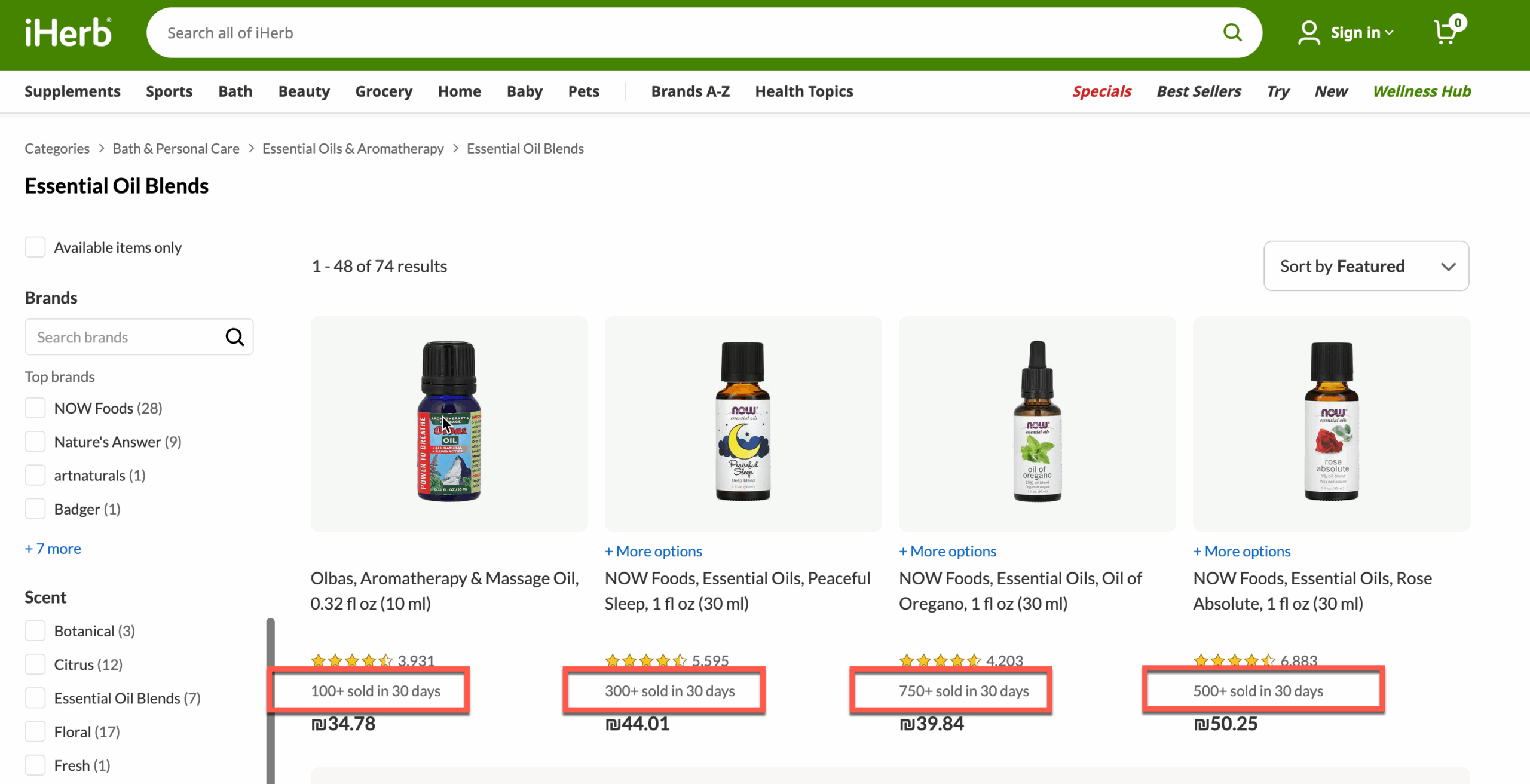
Social proof, such as “X people purchased in the last 24 hours,” builds confidence and urgency. Real-time notifications or counters reassure shoppers that others are also buying, which can nudge hesitant visitors over the finish line.
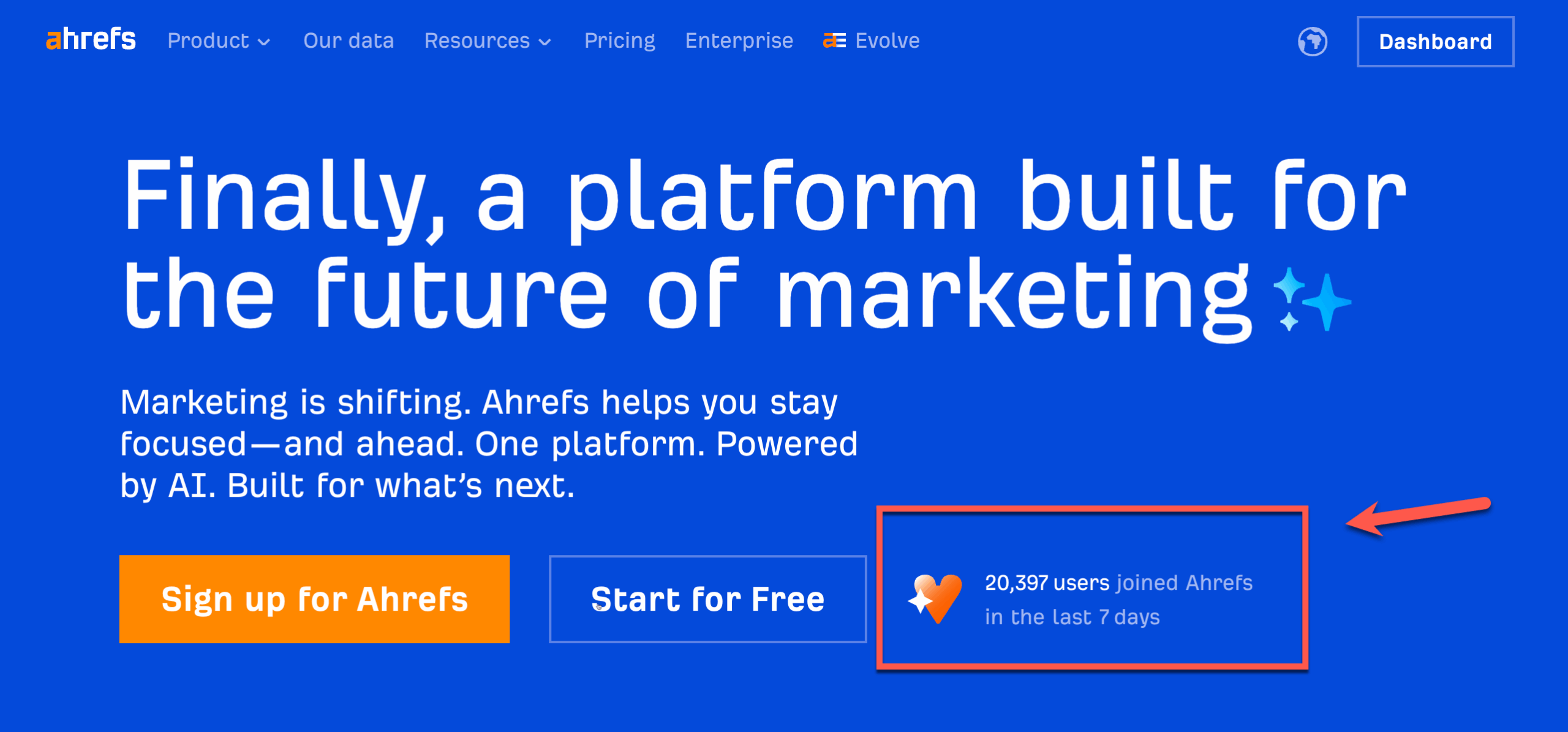
Ahrefs Social ProofCredit – https://ahrefs.com/

IherbCredit – https://iherb.com/

3. Optimize for Mobile

Mobile traffic often beats desktop for ecommerce, so your mobile experience needs to be fast, intuitive, and seamless. Analyze device-specific behavior with analytics tools to uncover drop-off points, slow load times, and opportunities to simplify navigation and checkout. Walmart Canada, for example, saw a 98% jump in mobile orders, and a 20% rise in overall conversions, after redesigning for mobile.

4. Prioritize Font Size and Legibility

Simple changes like using font sizes between 16-22px can make pages much easier to read and boost engagement. Test font sizes across product and checkout pages to maximize clarity, especially for mobile users.

5. Leverage Heatmaps and Session Recordings

Heatmaps and session recordings reveal what users actually do on your website, not just what you think they do. Tools like Userbird highlight which parts of a page attract attention-and where users get stuck or lost. Use this insight to surface your most important actions (like a bold “Start for Free” button) and remove distractions.
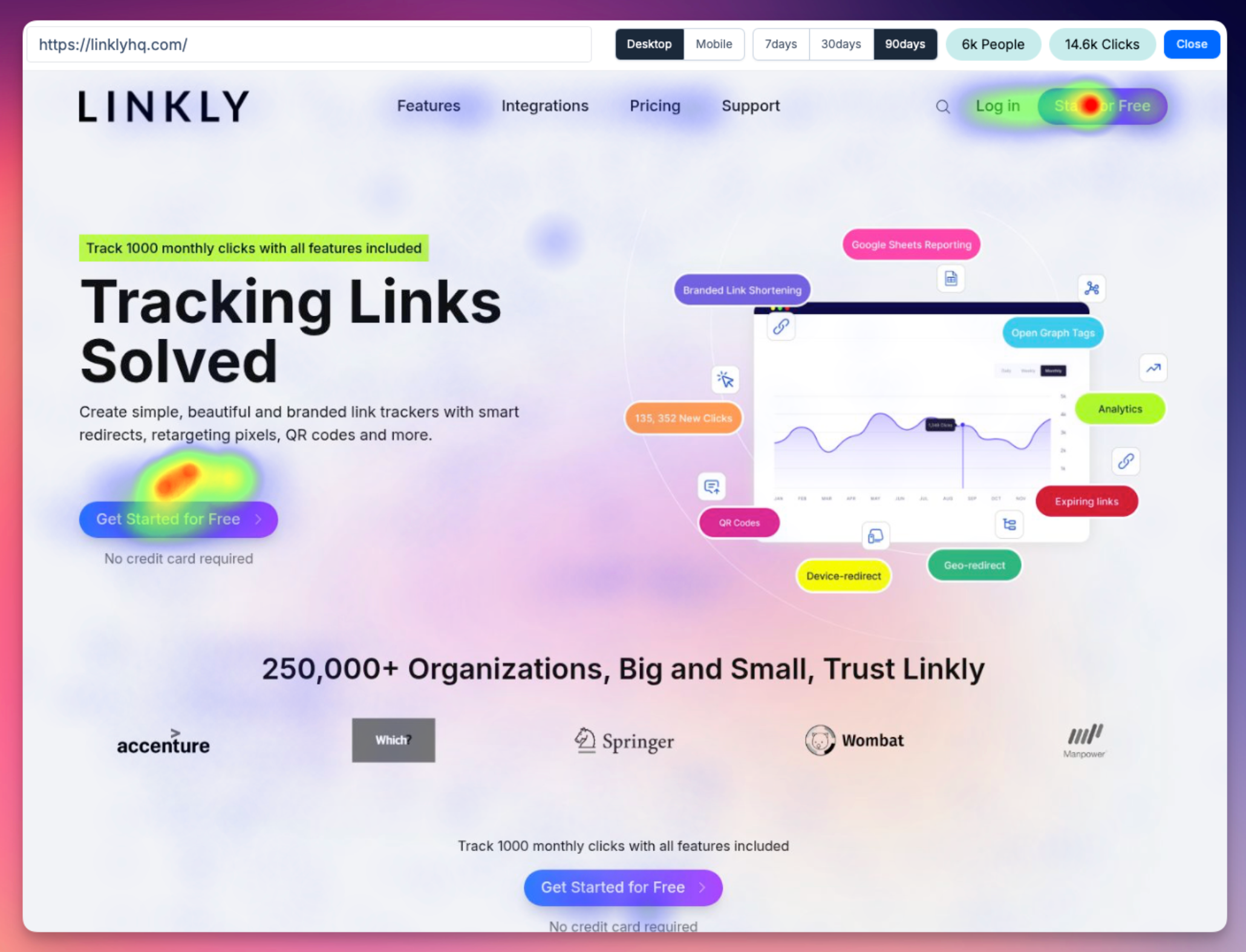
linkly.linkCredit – linkly.link

Mobile tip: Place CTAs where thumbs naturally rest in order to track and Improve Performance.

6. Personalize User Experiences

Personalization is a conversion machine. Data shows that relevant, personalized content can boost conversions by 41%. Whether it’s showing products based on location, purchase history, or ad keyword, tailored content makes customers feel seen. One case: First Midwest Bank drove a 195% increase in conversions with geographically personalized landing pages.

7. Analyze Your Conversion Funnel

Map out every step from landing to checkout. Linear, single-step checkouts may reduce friction, but multi-step forms can improve data capture, recover abandoned carts with targeted emails, and surface upsell opportunities. Use analytics to pinpoint where users drop off, and A/B test funnel structures to find the sweet spot.

8. Enable Image Zoom for Products

Let customers see your product in detail. For physical goods (clothing, furniture) or digital products (app screenshots), zoomable, high-resolution images drive trust and increase add-to-cart actions. For page speed, load high-res images only when users request them.

9. Make Returns and Guarantees Visible

Displaying a clear money-back guarantee or returns policy right next to the checkout instills confidence. Instead of linking to long policy pages, use concise, powerful statements (“30-Day Money Back Guarantee”) directly on the page and experiment with their placement and wording through A/B testing.

10. Test and Refine Your Pricing

Pricing is powerful. Even minor price shifts can dramatically impact your conversion rate and revenue. For example, Crazy Egg tripled its revenue by moving its plan from $29 to $99 without significant conversion loss. Always test price points, value statements (like “£14 for 14 days”), and watch for inflection points where conversions drop off.

11. Use Authentic Social Proof and Testimonials

Customer reviews, testimonials, and endorsements play a pivotal role in conversions. Opt for testimonials with names, photos, company roles, or (best of all) short, genuine video reviews. Anonymous or vague quotes have less impact. Case studies, interviews, and press features all add to the mix, just make sure they’re believable and easy to find.

12. Harness the Power of Retargeting

Most first-time visitors won’t buy, but retargeting helps reel them back in. Dynamic retargeting, especially for products a user viewed but didn’t purchase, can deliver a 70% higher conversion rate than standard ads. Platforms like Gumtree doubled conversions with smart retargeting, thanks to the relevance and timing these ads offer.

Summary

Conversion rate optimization is part data, part creativity, and always ongoing. The key is relentless experimentation, continually test page elements, messaging, and experiences. With paid advertising getting more competitive every year, your ability to turn more of your traffic into buyers will define your ecommerce success in 2025 and beyond.

Start by implementing a few of these strategies, measure the results, and keep testing. Your path to sustainable growth and higher profitability, starts now.

Is Wix Free? A Balanced Look at Features and Pricing

Wix is a popular platform that allows users to create websites, but a common question often arises—does it cost anything?

The answer is both yes and no. Wix offers a free plan that gives users access to its platform, but also offers several paid plans designed to unlock additional features.

This guide will examine what is included in each plan, breaking down their features, pricing, and limitations, so you can decide which option works best for your needs.

Wix free website builder


What Does Wix’s Free Plan Offer?

Wix’s free plan allows users to build and publish a website without any upfront costs. This entry-level plan includes the following features:

  1. Up to 500MB of storage and 1GB of bandwidth.
  2. Access to a library of over 2,000 customizable templates, offering layouts for various industries including eCommerce, construction, and creative portfolios. 
  3. Basic design options, such as custom color palettes, vector art, and a library of media resources like images and videos. 
  4. Built-in business tools, including SEO functionalities, a content management system (CMS), and email marketing tools. 
  5. Free hosting services and automatic SSL certificates for secure browsing.
  6. Access to the Wix App Market, where users can add functionalities like forms, galleries, and social media integrations. Many apps are free. 
  7. Websites are automatically mobile-optimized, plus users can create a free members-only app for their site. 
  8. Access to an extensive help center for support. 

While the free plan helps users get started, it comes with some limitations, which we’ll discuss next.


What Are the Limitations of the Free Plan?

Though the free plan can be sufficient for personal projects or early-stage ventures, it has notable drawbacks:

  • Limited bandwidth and storage: Users may face challenges if their site attracts high traffic or requires substantial media files. 
  • Branded domain: Free websites use a Wix-provided URL (e.g., username.wixsite.com/sitename), which may look unprofessional for businesses aiming to establish credibility. 
  • Wix branding: Ads promoting Wix appear on websites created under the free plan. 
  • No eCommerce functionalities: Payment processing and online store capabilities are only available on paid plans. 
  • Restricted integrations: Analytics tools like Google Analytics are not accessible on the free plan. 

For users needing more advanced features or looking to build a professional online presence, Wix offers paid plans. Below is an overview of these plans and their features.


Comparison of Wix’s Paid Plans

Wix’s paid subscriptions are available at various price points, tailored to meet different needs. All paid plans include options to connect a custom domain, remove Wix ads, and access enhanced support. 

PlanFeaturesPrice
Light2GB storage, 2 collaborators, basic marketing tools, and the ability to connect a custom domain.$17/month
CoreFree domain for 1 year, 50GB storage, basic eCommerce functionality, and up to 5 collaborators.$29/month
Business100GB storage, advanced marketing suite, standard eCommerce tools, and up to 10 collaborators.$36/month
Business EliteUnlimited storage, advanced eCommerce features, priority support, advanced marketing, and up to 100 collaborators.$159/month
wix pricing
Wix Pricing Plans


Key Features of Paid Plans

  1. Custom Domain Name: All premium plans allow users to connect or purchase a personalized domain name. 
  2. Ad Removal: Paid plans remove the Wix ads present on free websites. 
  3. Expanded Storage and Bandwidth: Higher-tier plans support larger sites and allow greater traffic. 
  4. ECommerce Tools: Starting with the Core plan, users can accept payments and set up online stores. 
  5. Additional Collaborators: Team members can contribute to the website with permissions that fit their roles. 


Choosing a Paid Plan 

When considering upgrading, it’s important to evaluate the features you’ll need. For example:

  • Small businesses may find the Core plan ideal, because it balances cost with essential tools like custom domains and eCommerce functionality. 
  • Growing businesses that need advanced operations or a plan for significant traffic might benefit from the Business plan. 
  • Large-scale operations seeking advanced eCommerce, marketing tools, and collaboration should consider Business Elite. 


Who Should Use the Free Plan?

The free plan can be a great starting point for individuals or groups who:

  • Want to test an idea or prototype a project. 
  • Are students creating portfolio websites, artists posting personal galleries, or community groups sharing information. 
  • Require a temporary or non-professional website, such as a personal blog or event page. 

This makes it valuable not only for personal projects, but also for those evaluating Wix’s capabilities before committing to a paid plan.


When Should You Opt for a Paid Plan?

For those planning to grow or run a professional operation, the paid plans unlock functionality essential for scalability. Some scenarios that often require a paid plan include:

  • Launching a professional business: Users aiming to build a credible website with a custom domain won’t want to rely on a branded URL. 
  • Opening an online store: Accepting payments and managing e-commerce functionality are critical features included only in paid subscriptions. 
  • Building a long-term brand: Ads often hamper branding efforts from a free plan. 
  • Handling high traffic: Expanding storage and bandwidth ensures smooth visitor experiences as a website scales. 

Users can upgrade seamlessly without losing existing work, ensuring a smooth transition whenever a paid plan becomes necessary.20

FAQ About Wix Plans

Yes, all design elements and content are retained during the upgrade. Paid features activate immediately, such as analytics tools and domain connections.

Wix does not impose a time limit on free plans. They remain available indefinitely unless you choose to delete your site.

Yes, hosting is included for both free and paid plans.

Wix’s subscription plans range from $0 for its free plan to $159 per month for its Business Elite plan.

Paid plans include one free domain for the first year. Free plan users receive a Wix-branded domain instead.